Shortwave is an AI-enhanced email client designed to transform how professionals manage their inboxes. It integrates advanced artificial intelligence directly into your email workflow to organize, search, compose, summarize, and automate email tasks — all with natural language commands and contextual intelligence.
At its core, Shortwave replaces traditional email clients with a smarter system that understands your communication context, automates routine work, and helps you focus on what matters most. You can use it on desktop, iOS, Android, and web platforms.
Key Features and Capabilities
1. AI-Powered Email Organization
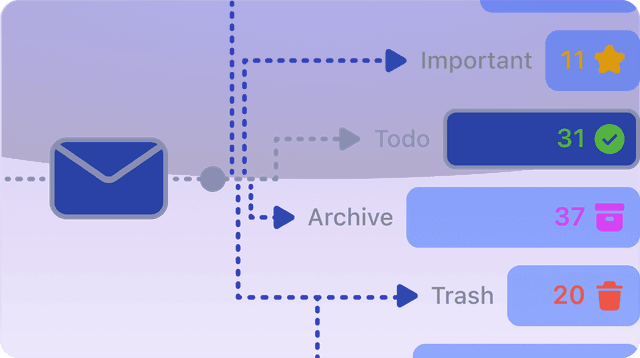
Shortwave uses AI to automatically categorize and clean up your inbox. It can identify important messages, archive or delete low-priority emails, convert threads into to-dos, and create custom filters with plain-language commands.
2. Intelligent Writing and Drafting
Shortwave’s AI Assistant writes, improves, and personalizes email drafts based on your style. It can generate responses, proofread text, rephrase for tone and clarity, and even autocomplete your sentences with keyboard shortcuts.
3. Natural Language Email Search
Instead of traditional keyword-based search, you can ask Shortwave like you would ask a colleague — “Find customer replies from last week and summarize key points.” The AI runs contextual search across your email history and returns answers with relevant threads.
4. Automated Scheduling and Workflow Integration
Shortwave’s AI can check your calendar, suggest meeting times, draft scheduling emails, and integrate with tools like Slack, Notion, Asana, and HubSpot to streamline workflow automation beyond email.
5. Instant Summaries and Insights
Instead of reading long threads in full, Shortwave delivers AI-generated summaries — concise, accurate overviews that help you quickly grasp the gist of any email or conversation.
How to Use Shortwave: A Practical Guide
Step 1: Sign Up and Connect Your Account
-
Visit Shortwave.com and create an account.
-
Connect your email (e.g., Gmail or Google Workspace).
-
Install the app on desktop or mobile if desired.
-
Allow permissions for email and calendar access — this enables the full AI experience.
Step 2: Let the AI Analyze Your Inbox
Once connected, Shortwave’s AI begins to scan and categorize your emails. It learns your writing style, preferences, and priority patterns — this personalization makes its suggestions more accurate over time.
Step 3: Use Natural Language for Commands
Shortwave is built around conversational input. Examples of practical commands include:
-
“Organize my inbox for today.”
-
“Archive all newsletters from last month.”
-
“Draft a reply to this email confirming Q1 deliverables.”
-
“Schedule a meeting next Tuesday at 10am with Jill and include Zoom link.”
These prompts let the AI execute complex workflows without manual setup.
Step 4: Enhance Productivity with Integrations
Shortwave can connect with productivity tools such as Slack, Notion, Asana, and HubSpot. This means you can push important information directly into your work tools, create tasks from email content, and sync your updates across your workflow in real time.
Step 5: Customize AI Behavior
Within settings, you can:
-
Save custom AI prompts for repetitive tasks.
-
Adjust how the AI responds (tone, language).
-
Integrate additional tools via Shortwave’s AI Integrations.
These options help tailor Shortwave to your workflow and communication style.
Why Shortwave Matters for Work
In today’s fast-paced work environments, professionals spend significant time managing email. Shortwave reimagines email from a burdensome inbox into a smart, automated workflow hub. With AI handling repetitive tasks, teams and individuals can:
-
Reduce time spent reading and replying to email.
-
Focus on strategic communication rather than administrative work.
-
Turn email content into actionable tasks and insights.
-
Quickly find information buried in old threads.
These advantages make Shortwave a compelling tool for productivity, especially for business users and teams.
Shortwave represents a new generation of AI-first email clients that go beyond simple automation. By combining natural language understanding, context-aware suggestions, integrated scheduling, and customizable workflows, it empowers professionals to manage email with far greater efficiency. Whether you need cleaner inboxes, smarter drafting tools, or deeper insights from your email history, Shortwave uses AI to elevate your workflow.
Comments
Post a Comment